Keeping what you write in your own hands — a small publishing tool
Part 1 of 4 — series: Building a publishing tool, and shipping it. Each part stands on its own; to follow the whole thing, see the series index. This part is the groundwork — what I wanted, and how the pieces fit. The individual design decisions come in later parts.
Where does what you write end up?
Most of the places we write are on someone else’s platform. They make it easy to be read, but the post’s address (its URL), its look, and your connection with readers all live by that platform’s rules. If the service changes course or shuts down, your writing goes with it.
That isn’t bad in itself. But for writing I want to keep around for a long time, I wanted a bit more of it under my own control. That’s what got me started on a small publishing tool, crofty.
In this series, I’m writing down what I thought about — and tripped over — while building crofty and getting it out the door. This first part lays the groundwork: what I was after, and how the whole thing flows.
What I was after
In a word: to own my content while still publishing it. Concretely, four things:
- Publish on my own domain — keep the post’s address (its URL) on my side
- Write in Markdown — plain text moves anywhere, and stays readable for a long time
- Make it a static site — no database, fast to load; swap the machinery and the posts are untouched
- Serve from the edge — opens quickly from anywhere in the world
Why not just an existing tool
Here’s a fair question. Tools for building static sites (SSGs) are already excellent — Hugo, for one, is fast and stable. In fact, crofty uses Hugo under the hood. So why build something else?
Because publishing doesn’t end at writing. Once you actually do it, small chores gather around the writing:
- setting up a place to write (the initial setup)
- checking that the post is well-formed
- checking that the output will open correctly where it’s served
- shipping it
- revisiting the look and settings later
I wanted these as thin, one-command-at-a-time steps, rather than a different routine each time. crofty isn’t a replacement for Hugo; it’s a thin layer on top. The base stays plain Hugo, so you can drop crofty at any moment and treat it as an ordinary Hugo project. That feeling of “always being able to take it back into your own hands” mattered from the start.
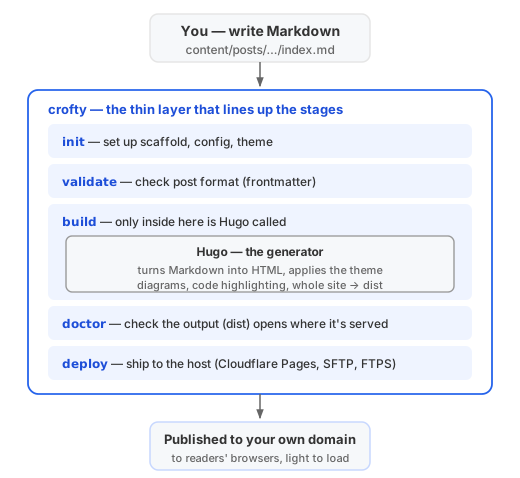
In other words, what crofty does is line up the chores around writing into thin steps: setup (init), checks (validate), output verification (doctor), shipping (deploy). The core work — turning Markdown into HTML and assembling the site — it hands to Hugo, called inside build. So Hugo’s speed and stability come through unchanged, and if you drop crofty, the Hugo base is still there in full.
(How to guarantee that the posts stay yours even when the tool changes is a whole post on its own, so I’ll leave it to the next part.)
How it flows
The actual flow is simple. Write Markdown, build, ship. Pretty much that.
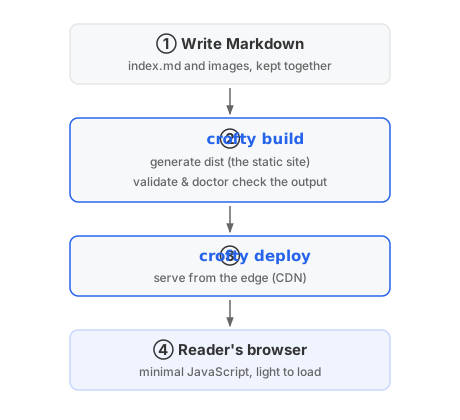
The commands, lined up by role, come to just this:
| Command | Role |
|---|---|
crofty init |
set up a place to write |
crofty build |
turn Markdown into a static site (dist) |
crofty validate |
check that posts are well-formed (front matter, etc.) |
crofty doctor |
check the output will open correctly where it’s served |
crofty deploy |
ship to your host (Cloudflare Pages, SFTP, or FTPS) |
crofty theme |
adjust the look |
No new runtime or database. What you write becomes dist, a pile of static files, and you just serve those. So it’s fast, and even if you revisit the machinery later, the posts themselves stay untouched.
Everything is a plain command typed at the terminal. A person can type them by hand; and because the steps are clear, it’s also easy to call from automation.
This very blog is built with it
For what it’s worth: the blog you’re reading is itself built with crofty.
- figures are baked in as SVG at build time (the flow diagram above, too)
- code coloring is handled at build time
- the JavaScript it loads is kept to a minimum
So it keeps its speed while still using figures, tables, and code freely. I build it and use it day to day, fixing the rough spots as I hit them. That’s how it took shape.
Can you make the site you actually want?
You can shape the look however you want. A page is built in nested layers, from the inside out, and you choose how far in you take ownership.
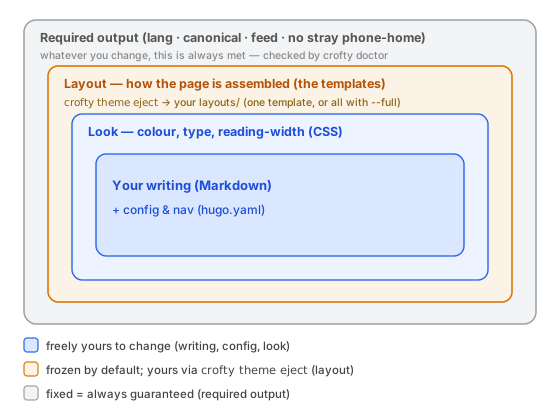
The further in, the more it’s yours: your writing and the look (CSS) are changeable anytime (this blog stays within that range). The outer layout (amber) is frozen by default, but crofty theme eject writes it into your own layouts/ to own — one template, or the whole thing with --full. Only the outermost requirements (grey) can’t change; crofty doctor guards them on every build. Frozen is a guardrail, not a cage.
What’s next
From here, the later parts dig into the individual decisions, one topic each:
- Going multilingual without adding JavaScript — which layer decides the language
- Shipping with brew and scoop — getting a personal tool distributed from your own hands
- Designing the commands — readable for people and automation alike, as “the state and the next move”
None of these are unique to crofty; they’re the road you walk whenever you make a small tool and give it away. If you also feel like keeping what you write in your own hands, I hope some corner of this helps.
Next: Designing a multilingual site →