Designing a CLI on the premise that an AI will drive it
Part 4 of 4 (finale) — series: Building a publishing tool, and shipping it. Last time was shipping with brew and scoop. See the series index. This time: designing the CLI on the premise that an AI drives it.
crofty is a plain CLI you type at the terminal. Its premise is just a little different: “a person installs it and does the first setup, then their AI (an agent) runs it.”
The aim is clear. If the CLI itself can tell you “what it can do and what to do next,” the AI doesn’t spend effort figuring out the tool through a back-and-forth with the user, and can put that toward thinking that actually matters. The “costs that pile up before the real work” look like this:
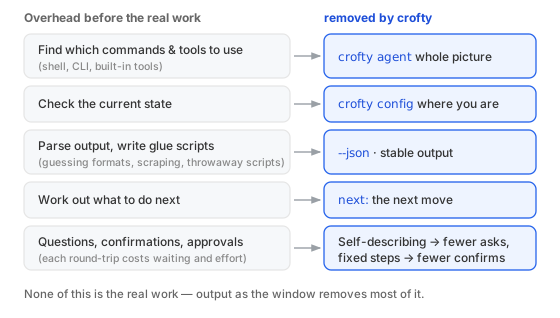
When you include an AI among the operators, how does design change? The finale is about that.
The window is the output, not a screen
A person can click a screen and read rendered documents; an agent is basically limited to running a command and reading the output. What both can reliably use is that common path — run a command, read the output.
So crofty builds no GUI, no admin panel, and makes the output text a window both people and agents can read. Three pillars.
1. Just ask ― start with crofty agent
What an agent wants first is “which commands exist, and how do I use them.” crofty agent returns that whole picture in one page — the commands and their flags, the usual order, and the surfaces for reading state. Hand it to an AI first, and it can start moving on its own. It’s the single most important command in crofty’s design.
From there, more focused views. crofty features returns “what you can do, and how to turn each thing on.”
$ crofty features
crofty features — what you can do, and how to turn each thing on.

Out of the box (works in a fresh project):
    rss        an Atom/RSS feed and a 'Follow by RSS' link
               → automatic — nothing to set
    share      reader share buttons, and `crofty share` …
               → automatic on posts; `crofty share <path>` for authors
    …

Restyle (owned, contract-safe):
    looks      ready-made colour/type presets (quiet-paper, terminal, …)
               → crofty theme set <name>
    …

Opt-in (off by default — one config key or a render hook):
    analytics  Cloudflare / GA4 / GTM / AdSense (no trackers by default)
               → crofty add analytics
    …
Each line pairs a capability with how to turn it on. crofty config returns “how things stand right now” the same way. Each is a window — for a person or an AI — to start moving without hunting through docs.
2. Print the next move, every time
Commands write not just the result but “what to do next” into the output. After a build, for instance:
$ crofty build
✓ built → ./dist
next:
  crofty preview     # look at it locally first (no account)
  crofty deploy      # put it online (connects a free Cloudflare account)
With next: there, you don’t have to remember the steps — follow the output and you move on. A kind hint for a person; a cue for an agent. There’s also a machine-readable channel, like adding --json to share output.
3. Don’t rewrite things — show them
crofty writes the files it owns, but it doesn’t quietly rewrite yours — hugo.yaml, say. Instead it guides: change this, here.
This helps people and agents alike. What’s about to happen, and what you should change, is visible in the output, so it never becomes a black box. A tool that doesn’t change state on its own is also one you can safely hand to an agent without worrying it’ll go off the rails.
In short
Include an AI among the operators, and what you lean on is no longer screen operations but “text you can read, ask, and find the next move in.” Instead of a GUI, make the output itself the best window — and the way in is crofty agent.
When the output is this complete, the AI doesn’t spend effort figuring out the tool, and can concentrate on thinking that actually matters. That, in the end, is where building out a CLI earns its keep.
That’s the end of all four parts. A thin pipeline for owning what you publish, multilingual by design, shipped with brew and scoop, and tuned so both a person and an AI can drive it. If it helps in even one corner for someone making a small tool and giving it away, that’s plenty.
← Previous: Shipping a CLI with brew and scoop | That’s the end of the series.