Writing the same file at once without breaking it
Series · Part 5 — “Building task management for AI agents.” Last time was partitioning the reach by structure. This time is about touching the same file at the same time.
Part 2 showed that the CLI and GUI of Amenbo (https://amenbo.work/) both touch the same store.sqlite. Separate processes write one file at the same time. Normally that looks like it would break. Why it doesn’t is the subject of this part.
Each write is one whole transaction
There are two knacks to it.
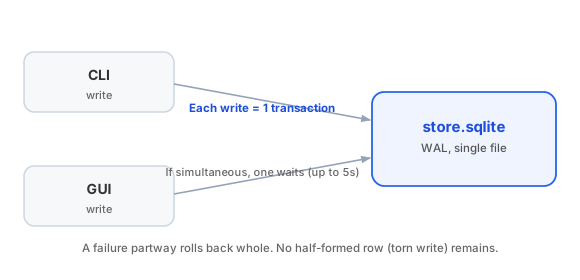
The first is to wrap each write whole in a single transaction. SQLite serializes writes, so when two processes arrive at once, one of them waits (up to 5 seconds). They don’t fight and fail — they pass through in order.
The second is to roll back whole when a write fails partway. Why “whole” is needed: earlier, when writes were streamed one row at a time, a crowded moment could leave a half-formed row behind. A write-in-progress row left empty would, by that one row alone, stall reads of the whole store. Since each write became one transaction, a failure leaves nothing behind.
Changes travel through change_feed
What the CLI writes shows up in the GUI right away. How does that work?
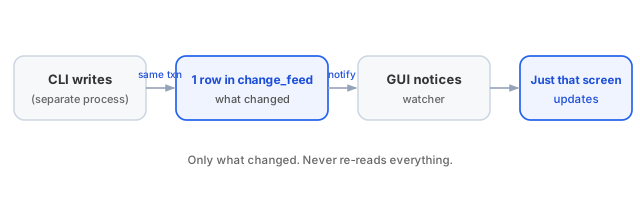
On every write, within the same transaction, it leaves one row describing “what changed” in a small record called change_feed. It holds no values, only which record changed. The GUI watches the file for change, follows the continuation of change_feed, and re-reads only what changed. Only the relevant screen updates; it never re-reads everything.
So even when the CLI or the AI writes from the terminal, the GUI catches up almost instantly, and only where it needs to.
Next time
Part 6: Running AI sessions in parallel. This part was about touching one file at the same time; next is running development with two or three AI sessions side by side — git worktrees, and reservation that only passes from todo, written up as a real case.