The big picture: how Amenbo is put together
Series · Part 2 — “Building task management for AI agents.” Last time covered why it was built. This time is the overall shape of how the inside is assembled.
Part 1 was about the “why.” This part is about “how it’s assembled.” Before getting into any individual piece of tech, here is the whole thing at a glance. The details get dug into one at a time in the parts that follow.
One monolithic Core, two entrances
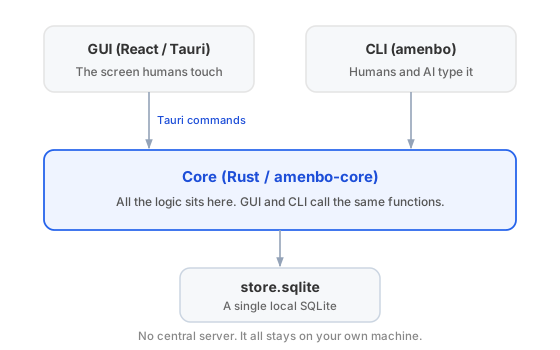
The insides of Amenbo (https://amenbo.work/) — the business logic — all live in the Rust Core (amenbo-core). The human-facing GUI (React / Tauri) and the CLI (amenbo) that both humans and AI type are thin skins over it. Both call the same Core functions.
Because of that, a feature added from either entrance rides on the same single implementation. There is no central server.
The data lives in the app-data area, not the folder
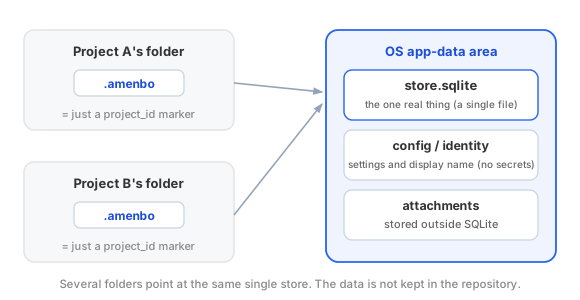
This may be surprising: the project folder holds no data. All that sits there is a small marker called .amenbo, whose content is just a number (project_id) pointing at which project it is.
The real thing is a single store.sqlite in the OS app-data area. Settings and the display name live in separate files, which hold no secrets either. One store can be pointed at from several folders.
The store is a graph of tasks and decisions
The content of store.sqlite is not a set of scattered tables but a graph. The “connection between decisions and tasks” from Part 1 is directly the shape of the data.
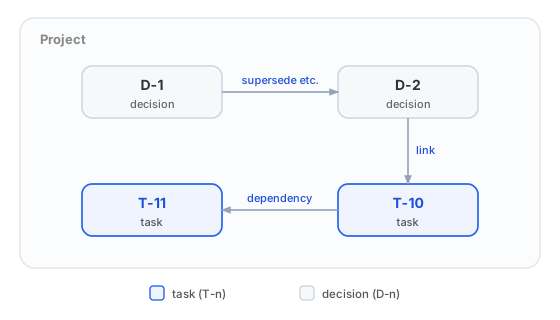
- Tasks and decisions are the two kinds of node.
- Decisions join to decisions through supersede and the like, decisions join to tasks through links, and tasks join to tasks through dependency — each joined by edges.
What Part 1 called “which records to read, in what relation” is this structure.
Where the series digs next
That is the overall shape. From the next part on, the series zooms into pieces of it. For example —
- Part 3: why catching up is fast
- the mechanism that partitions the AI’s reach with
.amenbo - why the GUI and the CLI touching the same SQLite at once doesn’t break it
For now, just keep “where things are” in your head.